
NFC tap
The NFC tag is encoded to a short Loyalty Chips tap URL like /t/:chipId. A compatible phone reads the tag near the back of the device and opens the reward page.
Loyalty Chips turns a physical handoff into a customer-owned reward loop: branded NFC + QR hardware, a fast reward page, consented customer details, dashboard records, and optional Wallet passes after enrollment.

Every production chip, card, sticker, wristband, or stand can carry both an encoded NFC tag and a printed QR code. Your staff hands it out or places it at the counter; the customer uses whichever path their phone prefers.
The NFC tag is encoded to a short Loyalty Chips tap URL like /t/:chipId. A compatible phone reads the tag near the back of the device and opens the reward page.
The printed QR code points to a matching resolver like /q/:chipId. Any modern phone camera can scan it, so customers have a backup path if NFC is unavailable.
Both paths log the scan method, resolve the chip ID, and send the customer to the venue-branded reward page. Your offer can change later without reprinting the hardware.
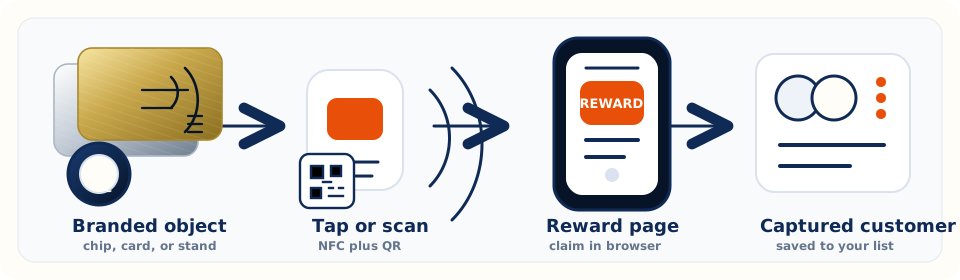
The tap or scan opens a mobile web page with your venue name, offer, and instructions. No customer app install is required.
The customer enters the fields your reward requires, usually name, phone, and email, and accepts the venue messaging terms before claim.
The page shows a reward code and staff instructions. The dashboard can track whether the code has been issued, viewed, or redeemed.
The customer can save the pass to Wallet when configured, or keep the physical object and tap or scan again on a future visit.
The merchant dashboard turns those physical moments into a usable customer list: who claimed, how they entered, which chip or card they used, and whether they gave permission for follow-up.
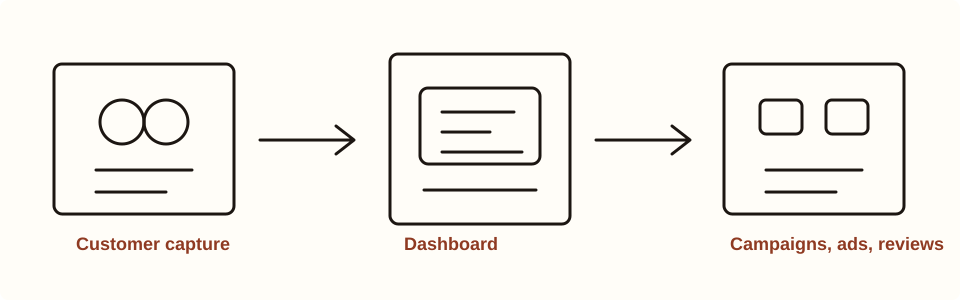
Each resolver can record chip ID, method, device context, and time so your team can see whether QR, NFC, demo, or wallet traffic is working.
Consented customer details land in your private venue workspace. Owners can review names, contact fields, first scan, last seen, and visit counts.
Loyalty Base supports exports and email campaign workflows. SMS and deeper POS integrations are configured separately when your rollout needs them.
The chip, card, sticker, or stand is the acquisition moment. Apple Wallet and Google Wallet are offered after a successful claim so returning customers can carry the venue pass on their phone.
When Apple pass credentials are configured, the reward success screen can offer an Apple Wallet pass with venue branding and a customer-linked barcode or QR payload.
When Google Wallet credentials are configured, the success screen can request a save link for a Google Wallet pass tied to the enrolled customer.
Wallet does not silently collect customer details. The customer first claims the reward and consents on the web page; Wallet helps them return faster later.
If wallet signing is not configured in an environment, the reward page should say Wallet is unavailable instead of pretending the pass is live.
Choose the format, approve artwork, encode NFC + QR, set the reward, and invite your team into the dashboard before the first batch goes live.

